Island News & Updates
Past Update Journal: Iso-Island 6.4.1
View all past Update Logs
Weekly updates will become more frequent as we continue to work on the website.
- Website updates, changes, and fixes are from the previous seven days and have already been applied to the site.
- DeviantArt Group updates, changes, and fixes will take effect and go live soon after this post is live (All of these have already gone live on the website version)
Website Updates
Updates
- All roaming characters have been ported over and can be purchased through The Daycare.
- Critters, equipment, and accessories can now be purchased through shops. Many current equipment and accessories are still considered items on the site and will be updated in the coming days.
Shops
- Fully Stocked Darwin's Exchange Center
- Added Cotton Bundle, Light Seashell Bundle, Heavy Seashell Bundle, and Bulky Seashell Bundle items. These are "box" items and can be opened from your inventory.
- Added Wooden Pickaxe and Obsidian Claws to Charlotte's Iron Emporium
- Removed Black Pearl from Hasha's Hut
- Darwin has claimed these Black Pearls are not genuine as they are handmade and devalued actual Black Pearls while costing too much. He will not be fooled by these fakes. Hasha has decided to sell these no longer, but she can't stop her pupils of the Witch Doctor class from making them and trying to fool Darwin.
Changes
- Hid scavenger hunt targets for those who are not logged in
- Added a small portion of updated item art
- Added descriptions to items (only to the ones with art at this time)
- Pearls are now considered currency
- Cleaned up the Iso Island page appearance
- Cleaned up Inhabitants > Adopts page formatting
- The site News page is now called Island News
- Decreased cooldown from 7 to 5 days
- Updated reward drops
- Cleaned up page appearance a bit
Fixes
- Fixed register and login through Discord, Toyhouse, and DeviantArt not working
- Fixed bug where users could change critter variants without a proper item
- Fixed incorrect URL for Isoling Club page
- Fixed 500 error when buying from shops
- Fixed 500 error on the training page
- Fixed 500 error when viewing Masterlist
- Fixed 500 error on pages with the "/world" slug
- Various lingo and string updates across the site
- Removed duplicate Isoling Club link on the navigation bar
A brief welcome to all new and returning players. To get started, we are going to take a look at user profiles and character master lists pages.
Before we begin, verify your account by linking it to an alias if you were a player on the DeviantArt version of the ARPG. When linked to your alias, any characters and items you may have owned will be linked and added to your account.
If you no longer have your DeviantArt account and know you had characters, please email us at npc@isomaraisland.com with all known previously used DA usernames and your username here, so we can verify and link your characters.
Your Profile
When logged in you can access your profile page from the top right-hand of the nav bar next to your avatar. A dropdown is present that will take you right to your profile. While there, you can view a user's information, Isomara, companions, items, and about everything else.
Customization
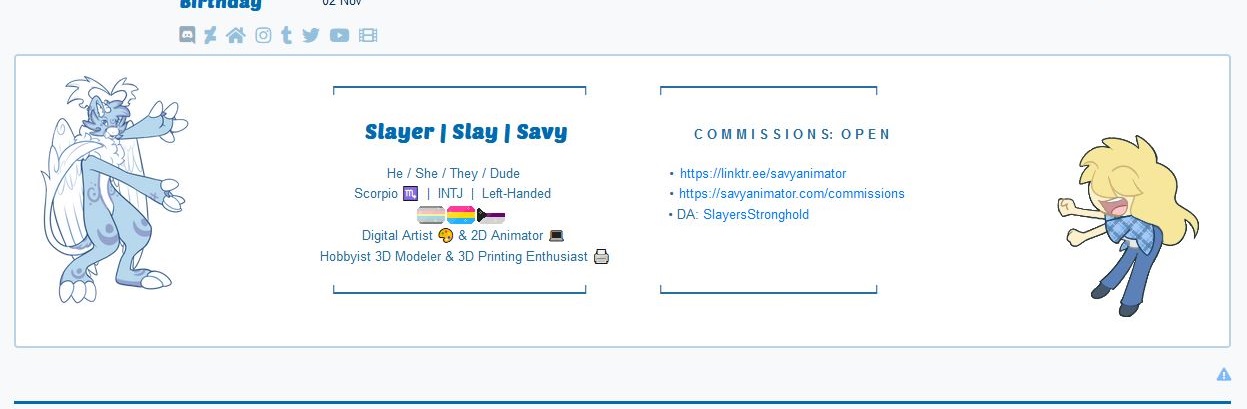
You can customize the contents of the block right under the basic account information by going to account settings. Account profiles support the use of HTML and some CSS elements, so go forth and show us your style and creativity with a personalized description. Here's an example:
Characters
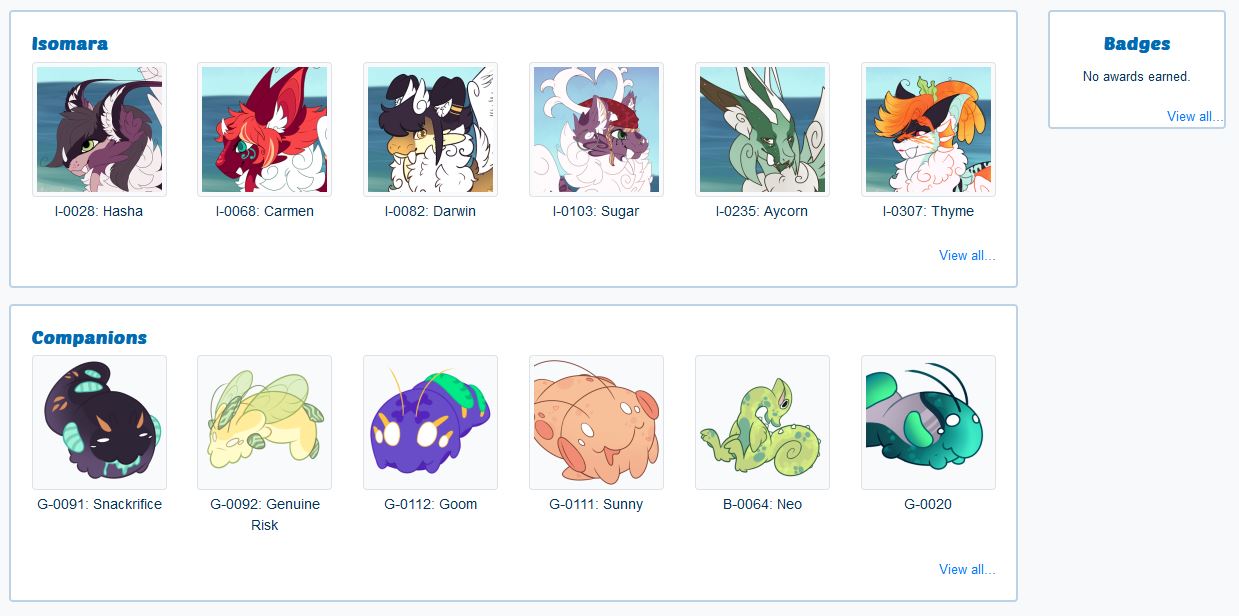
Characters are broken down into two sections Isomara and Companions. Companions make up Gooms, Bleppers, Memics, and Memora currently. You can quickly navigate to the character's master list page by selecting them from here.
Badges
Similar to achievements for characters, badges are awards for yourself. Badges can appear by just playing the game or participating in events. If you're reading this soon after it was posted you probably have the Iso-Island support badge!
Items
Are separated into four (4) sections: Inventory, Equipment, Accessories, and Critters
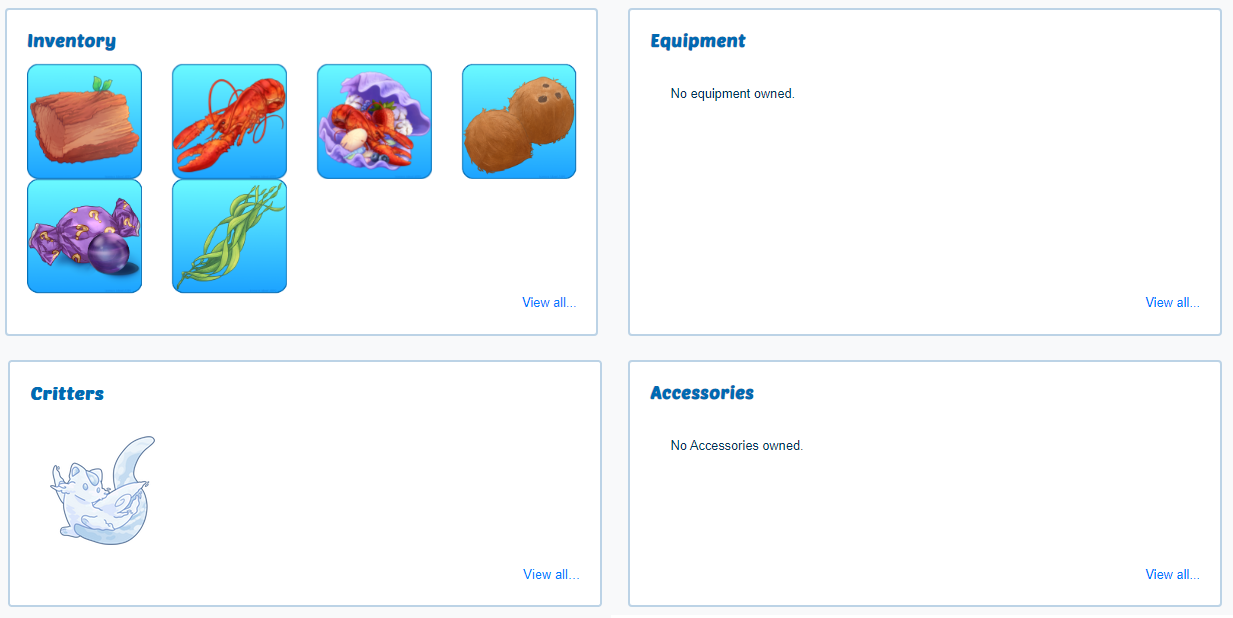
To interact and use any of these items, you must select "View all..." and then you can select an item and choose the amount and what you want to do with it.
When selecting an item, a new pop-up window will appear showing the item image, name, where you got it from, and how many. Then are dropdown options for the items. With most items, you can Donate (this will toss the item directly into Darwin's Donations), Sell (removes from your inventory and gives you currency in return), Transfer (gifts the item to another player), or Delete (this permanently deletes the item from the game). Be sure to click the check mark and select the quantity you want to use.
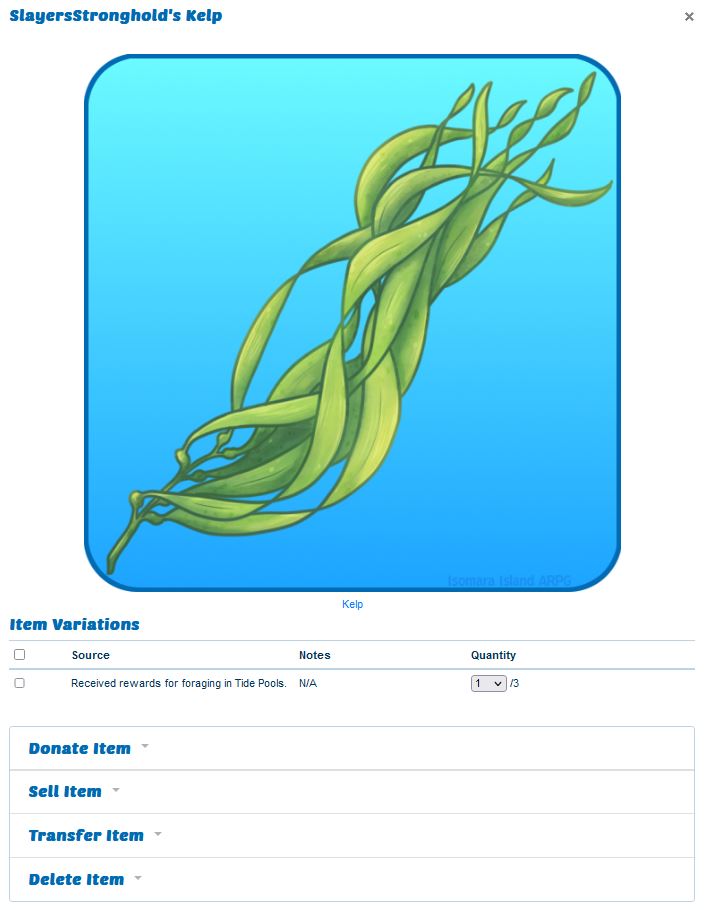
Some items will have additional dropdown fields, such as the coconut. Where it is classified as a "Box" item, meaning you can open it up. Cracking open a coconut removes the coconut from your inventory but in return, gives you the items Coconut Husks, Coconut Meat, and Coconut Water!

Note: Currently consuming edible items is not automated and won't be an available dropdown option. We are actively working on implementing this feature. In the meantime, if you want to feed an item to any of your characters and earn the consumption benefits, please submit a claim mentioning the items you are feeding, the amount, and which Isomara are eating the food.
Equipment, Accessories, and Critters have the dropdown to Attach to Characters. When attached to a character, the item will remain visible in your list of all items, but will mention it being attached to a character.
Character Masterlist Pages
You can query and view all characters on the masterlist.
Information
The first thing you'll notice on the right-hand side is the basic information and traits of the character. We kept the appearance close to a familiar look as the DeviantArt version of the masterlist import pages.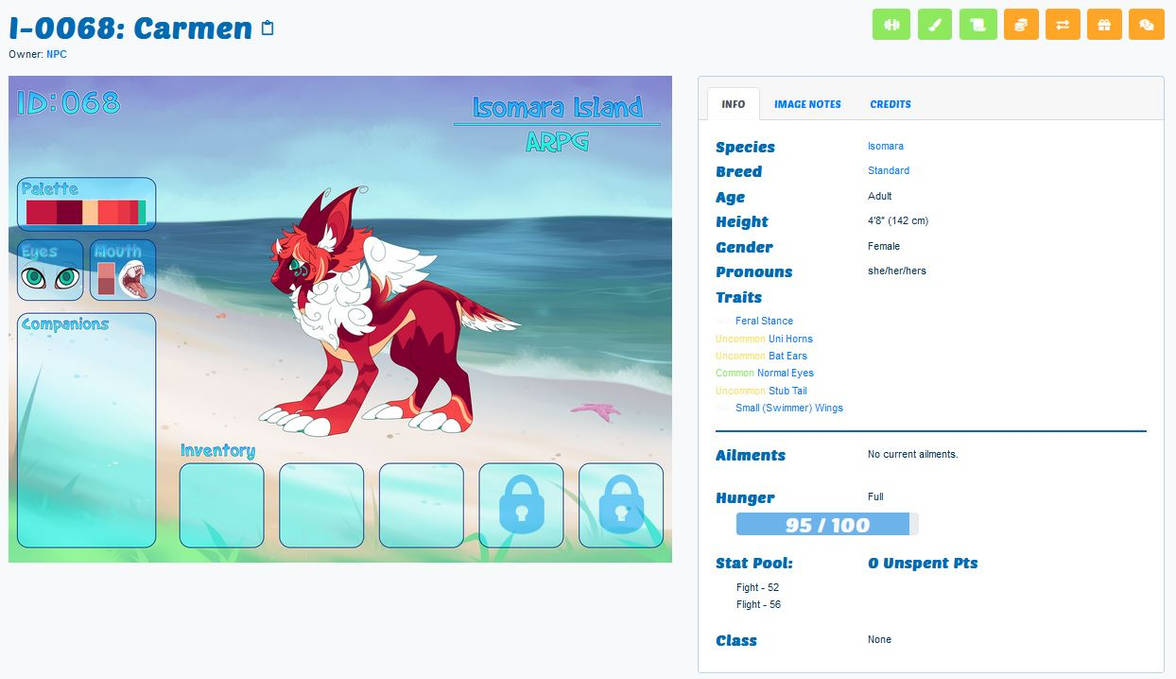
Profile Customization
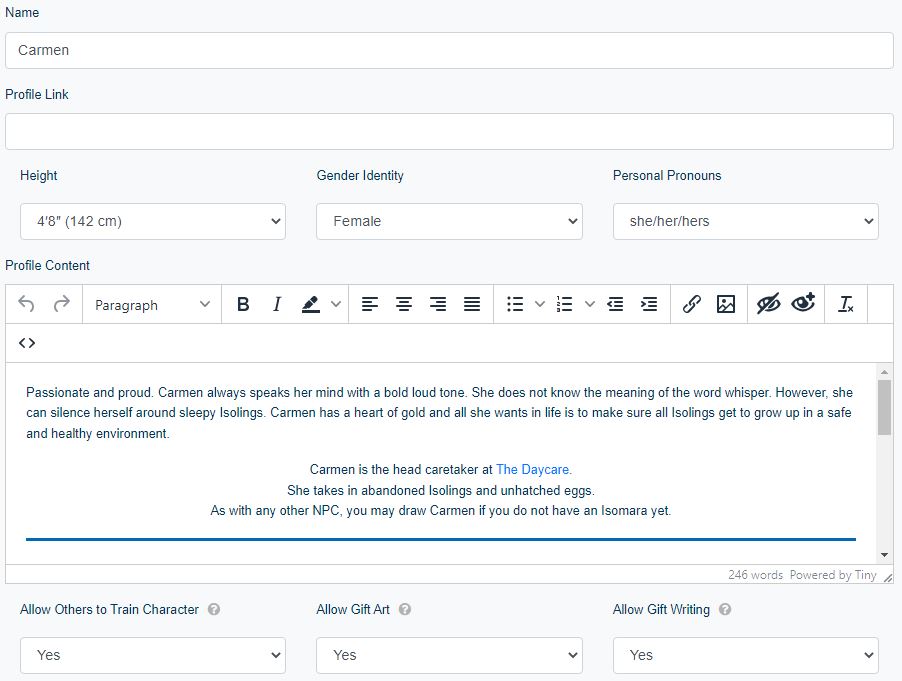
Below the info box and image is a content box with Profile and Lineage tabs. The Profile box is similar to a user's profile box; this box can be customized to the owner's liking using HTML. Use the "Edit Profile" button to take you to the edit page where you can update not just the profile box content but also add the character's name, link a Toyhou.se page if you have one, and list their height, gender identity, and/or pronouns. Height, gender identity, and pronouns will not be shown if not set on this page. You can update them whenever you want! Below the profile edit box will also be dropdowns to set whether you are okay with other users using your character in trainings and gaining stat points, allowing gift art and/or gift writing.
Companions and Critters
Companions can be equipped/unequipped to Isomaras via submitting a claim. Due to how companioning works in our backend, this is a feature only the admin can access. Critters can be attached to characters via your inventory as mentioned above in the Items section of Your Profile (the same goes for equipment and accessories).
Achievements
Character awards are granted by playing the game, completing activities, prompts, and various other aspects of gameplay. If your character is missing achievements, please submit a report.
The Sidebar
The dreaded sidebar that you see on characters, profiles, and much of the site is a smaller navigation bar that has plenty of valuable links. This sidebar on a character's page will contain links to the character's inventory, official design images, gallery images (from submitted prompts and general art), and various history logs. Take your time looking through them,a nd if you ever have a question, please do ask.
Past Update Journal: Iso-Island 6.4
View all past Update Logs
Weekly updates will become more frequent as we continue to work on the website.
- Website updates, changes, and fixes are from the previous seven days and have already been applied to the site.
- DeviantArt Group updates, changes, and fixes will take effect and go live soon after this post is live (All of these have already gone live on the website version)
Website Updates
Updates
- Added respective art banners to Queen's Cache and Tide Pools pages
- Added Island map to map page along with biomes descriptions with links to notable locations such as shops and creatures that can be found
- Added copy to clipboard function to quickly copy a character's masterlist ID
- Implemented The Wishful Well. We are bringing back the old Wishful Well game, where users can toss items into the well in hopes for a wish to be granted.
- The features and limitations of the game are being finalized
- Note that the DeviantArt version of the Wishful Well will remain offline
Changes
- Removed training permissions from companions as they do not have stats
- Removed height fields from companions
Fixes
- Resolved issue with inability to companion characters together
- Added missing Exploration page link to Beginner's Guide
- Fixed a bug with submitting reports and comments
DeviantArt Group Updates
Updates
Exploration Reward Balancing
- Increased min amount of Feathers able to find in Jungle from 0 to 1, increased max from 3 to 5
- Increased min amount of Skrill able to find in Ocean from 0 to 2
- Increased min amount of Scallops able to find in Ocean from 0 to 1
- Increased min amount of Seashells able to find in Snow from 0 to 2
- Increased min amount of Flowering Quince able to find in Snow from 0 to 1
- Increased min amount of Witch Hazel able to find in Snow from 0 to 1
- Increased min amount of Peanuts able to find in Infected from 0 to 2, increased max from 7 to 9
- Increased min amount of Potatoes able to find in Infected from 0 to 1, increased max from 2 to 3
- Increased min amount of Grapefruit able to find in Infected from 0 to 1, increased max from 2 to 3
- Increased min amount of Seashells able to find in Pelemoku from 5 to 10
- Increased max amount of Crabs able to find in Pelemoku from 1 to 2
- Increased max amount of Bones able to find in Pelemoku from 1 to 2
- Increased max amount of Obsidian able to find in Pelemoku from 1 to 2
- Increased min amount of Flowers able to find in Pelemoku from 0 to 1
- Increased max amount of Teeth able to find in Pelemoku from 1 to 2
- Increased max amount of Crab able to find in Coral Reef from 1 to 2
Removed Items
These items have been removed from the ARPG. Anyone who owns these items currently have been refunded the equivalent Sand Dollar/Seashell amount.
- Gender Remedy
- Bond Certificate
Changes
- Renamed Coconut Shell to Coconut Husk
- Replaced Gender field to Gender Identity field and added Personal Pronouns field
- Originally when the ARPG was created, we kept the same simple guidelines that many other ARPG and species communities used where gender was the biological sex and kept breeding simple. The way the ARPG handles gender/sex has become unrestricted as this is not a breeding-focused ARPG and does not need to be policed. We will no longer restrict the "gender" field to only male and female. A character's genitals are between themself, the owner player, and anyone the owner choose to share the information with. Any Isomara will be able to court with another no matter gender/sex, and any items related to same-sex mating if any, will be removed from the game. Now the field of gender and personal pronouns will be simply additional character information if the owner chooses to display it.
- You can add your character's gender identity and personal pronouns by commenting on the UPDATES thread of their masterlist import on IsomaraIndex

-
The website Masterlist pages will have an edit button allowing the character's owner to change gender identity and personal pronouns whenever they see fit!
You heard right. Early Access begins June 2nd. Support Us to receive an invitation key to register for an account starting June 2nd. In-game rewards will also be added to your account if you support us once registered.
If you are reading this right now, you might be one of the first members of the site. If so, Hi! We are happy to have you here! Please send over any feedback, bugs, and questions you may have to the Support Center.
During Early Access, we will diligently work on porting over all activities, species, and world information and updating placeholder artwork. A development roadmap will be available during Early Access.

The Isomara Island ARPG official Discord Server is back and available to the public!
After a hectic month and the old server being wiped after a malicious hacker attack we have brought back the server from the ashes like a majestic phoenix. If you remember the old server then you may notice the removal of some channels which we deemed outdated or no longer useful as well as some new features!
These new features include converting the Ask an NPC, Questions and Answers, and Suggestion-box channels into proper thread channels. Threads will also the staff to better assist and communicate with members without confusion and muddy conversations. Please be sure to check the post guidelines before making a new thread in these channels.